
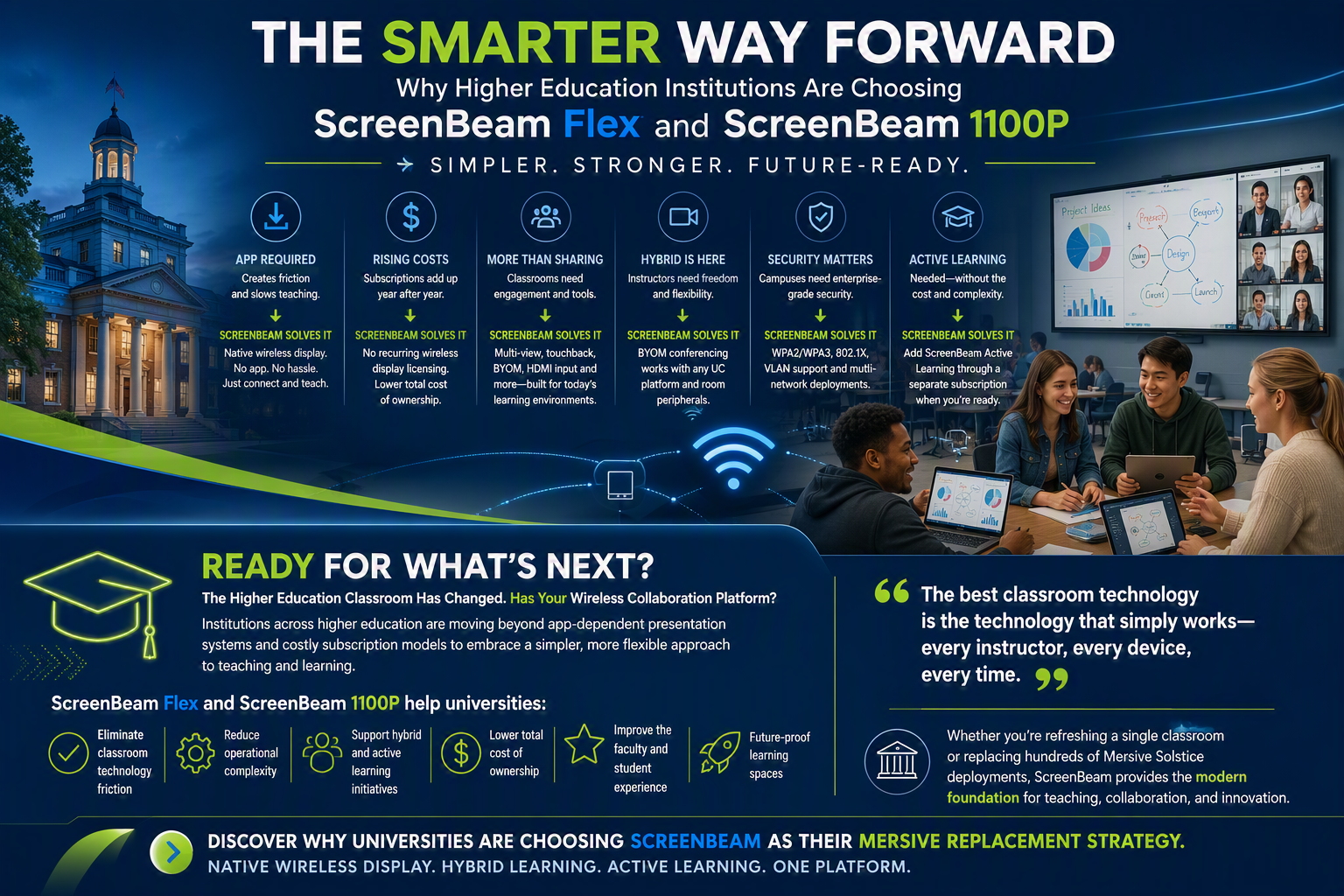
Higher education classrooms have changed dramatically over the past few years. Faculty expect technology that works instantly. Students bring a mix of Windows, Mac, Chromebook, iPad, and Android devices. IT teams are under pressure to improve classroom technology while controlling costs. At the same time, institutions are supporting hybrid learning, active learning, and increasingly complex campus security requirements.
Many universities that standardized on Mersive Solstice years ago are now evaluating alternatives. Across the higher education market, ScreenBeam is seeing growing interest from institutions looking to modernize their wireless presentation and collaboration environments while reducing complexity and total cost of ownership.
For these institutions, ScreenBeam Flex and ScreenBeam 1100P are emerging as compelling replacement solutions.
The Problem: Yesterday’s Wireless Presentation Platform in Today’s Learning Environment
When Mersive Solstice first gained traction in higher education, it addressed a real need for wireless content sharing and collaboration. Today, universities expect more.
Modern classrooms require:
- App-free wireless sharing
- Support for every device type
- Hybrid learning capabilities
- Flexible room configurations
- Lower operational costs
- High quality support services for AV/IT
- Enterprise security
- Simplified management
- Future-ready instructional tools
Many universities have discovered that maintaining these capabilities with app-dependent and subscription-based solutions can increase both administrative overhead and long-term costs. Competitive analyses show that advanced management and conferencing capabilities for Mersive environments are often tied to subscriptions and software-based workflows.
Pain Point #1: Faculty Don’t Want to Install an App to Teach
One of the most common frustrations in higher education is technology that slows down the start of class.
Professors, adjunct instructors, guest lecturers, and students frequently arrive with different devices and varying levels of technical expertise. Any requirement to download software, install drivers, or create accounts introduces friction.
How ScreenBeam Solves It
ScreenBeam Flex and ScreenBeam 1100P support native wireless display technologies built into:
- Windows
- macOS
- iOS
- Android
- ChromeOS
No application installation is required for standard wireless presentation.
Faculty simply enter the room, connect, and begin presenting.
This eliminates support calls, reduces classroom delays, and creates a more intuitive experience for both instructors and students. Competitive comparisons indicate that ScreenBeam supports native wireless presentation while Mersive environments rely on the Solstice application experience.
Pain Point #2: Subscription Costs Continue to Grow
University IT budgets are increasingly scrutinized.
Many institutions are looking beyond acquisition cost and focusing on total cost of ownership over three, five, or even seven years.
Recurring subscriptions, annual renewals, and cloud management fees can significantly increase the true cost of classroom technology deployments.
How ScreenBeam Solves It
ScreenBeam 1100P delivers:
- Native wireless display
- Included centralized management
- Included BYOM conferencing capabilities
- No recurring wireless display licensing
ScreenBeam’s management platform and conferencing capabilities are included with the receiver, helping universities reduce ongoing operational expenses. Competitive analyses show significant long-term TCO advantages compared to subscription-oriented alternatives.
For institutions deploying technology across dozens, hundreds, or thousands of learning spaces, the savings can be substantial.
Pain Point #3: Classrooms Need More Than Wireless Display
Wireless presentation is no longer enough.
Universities increasingly seek technologies that support student engagement, collaboration, instructional flexibility, and hybrid learning environments.
How ScreenBeam Solves It
ScreenBeam 1100P is designed as a complete classroom collaboration platform, delivering:
- Native wireless display
- Multi-view collaboration
- Touchback and inking support
- Digital signage
- BYOM conferencing
- HDMI input support
- USB camera integration
- Centralized management
Higher education deployment materials position ScreenBeam 1100P as a platform that supports both instructional and administrative use cases, allowing institutions to standardize on a single solution across a wide range of learning environments.
Active Learning Without the Cost and Complexity
As universities continue shifting toward collaborative teaching models, Active Learning has become a strategic priority.
However, many institutions struggle with the cost and complexity traditionally associated with Active Learning deployments.
Dedicated student stations, specialized hardware, extensive AV infrastructure, and costly room redesigns often limit adoption.
The ScreenBeam Advantage
ScreenBeam 1100P provides institutions with a flexible pathway to Active Learning.
Universities can deploy ScreenBeam 1100P initially as a wireless presentation and hybrid learning platform, then add ScreenBeam Active Learning capabilities when needed through a separate subscription. This allows institutions to align investments with actual instructional needs and budgets.
How ScreenBeam Active Learning Compares to Mersive Active Learning
Start with Wireless Display, Expand Later
Many Active Learning platforms require significant upfront investment.
ScreenBeam allows institutions to begin with wireless display and collaboration today while preserving the ability to add Active Learning functionality later. Schools can selectively enable Active Learning in specific classrooms, business schools, engineering labs, collaborative learning spaces, or pilot programs without replacing existing hardware.
Lower Infrastructure Requirements
ScreenBeam’s approach leverages the existing ScreenBeam classroom deployment, reducing the need for additional hardware throughout the room. This can simplify deployments and reduce ongoing maintenance compared to more hardware-intensive Active Learning designs.
Better Support for Modern Pedagogy
Higher education continues moving toward group-based and collaborative learning models.
ScreenBeam Active Learning is designed to support:
- Student collaboration
- Group-based learning
- Instructor moderation
- Content sharing between teams
- Classroom-wide engagement
ScreenBeam’s higher education strategy specifically emphasizes support for collaborative and active learning environments that encourage participation rather than passive content consumption.
Important: ScreenBeam Active Learning requires a separate subscription and is not included with the standard ScreenBeam 1100P license.
Pain Point #4: Hybrid Learning Is Here to Stay
Hybrid teaching is no longer a temporary requirement.
Faculty need the freedom to connect room cameras, microphones, and speakers while using their preferred conferencing platform.
How ScreenBeam Solves It
ScreenBeam 1100P includes integrated BYOM capabilities that enable instructors to wirelessly connect to room peripherals while using:
- Microsoft Teams
- Zoom
- Webex
- Google Meet
- Other leading conferencing platforms
This gives universities a UC-agnostic classroom solution that works across departments and academic programs without forcing standardization on a single conferencing platform.
Pain Point #5: Security and Network Requirements Continue to Increase
Universities face increasingly sophisticated cybersecurity requirements.
IT administrators need wireless presentation solutions that fit securely within complex campus environments.
How ScreenBeam Solves It
ScreenBeam supports enterprise-grade capabilities such as:
- WPA2/WPA3 security
- 802.1X authentication
- Certificate-based security
- VLAN support
- Multi-network deployment architectures
Higher education planning materials specifically identify secure multi-network deployment as a key differentiator for universities with complex campus environments and stringent security requirements.
Why ScreenBeam Flex?
For many institutions, not every room requires the advanced capabilities of the 1100P.
ScreenBeam Flex provides a cost-effective migration path for:
- Standard classrooms
- Learning spaces
- Study rooms
- Huddle rooms
- Department conference rooms
Flex delivers the simplicity and reliability universities need while maintaining a consistent user experience across campus.
Many institutions choose a blended strategy:
- ScreenBeam 1100P for active learning and premium classrooms
- ScreenBeam Flex for standard learning spaces
This enables schools to optimize both functionality and budget.
The Bottom Line
Universities are not replacing Mersive because wireless presentation is unimportant.
They are replacing Mersive because classroom expectations have evolved.
Today’s higher education institutions want:
✅ Native wireless display with no app required
✅ Lower total cost of ownership
✅ High quality support services for IT/AV
✅ Simplified deployment and management
✅ Better hybrid learning support
✅ Stronger security capabilities
✅ A flexible path to Active Learning
✅ Future-ready classroom technology
ScreenBeam Flex and ScreenBeam 1100P address these requirements while preserving the simple classroom experience that faculty and students expect.
For institutions looking to modernize aging Solstice deployments, support active and hybrid learning, reduce recurring costs, and establish a long-term classroom technology strategy, ScreenBeam represents a powerful and practical next step.